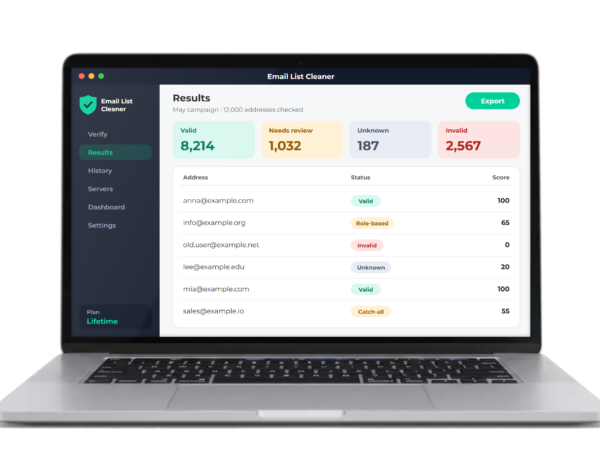
VeriMail Pro is now Email List Cleaner. New name, same product. What this means for you
Formerly VeriMail Pro
Email List Cleaner: Find Bad Emails Before You Send
Drop in your list. Email List Cleaner checks every address and tells you which ones are good, which are bad and which need a closer look. No email is ever sent to your contacts.
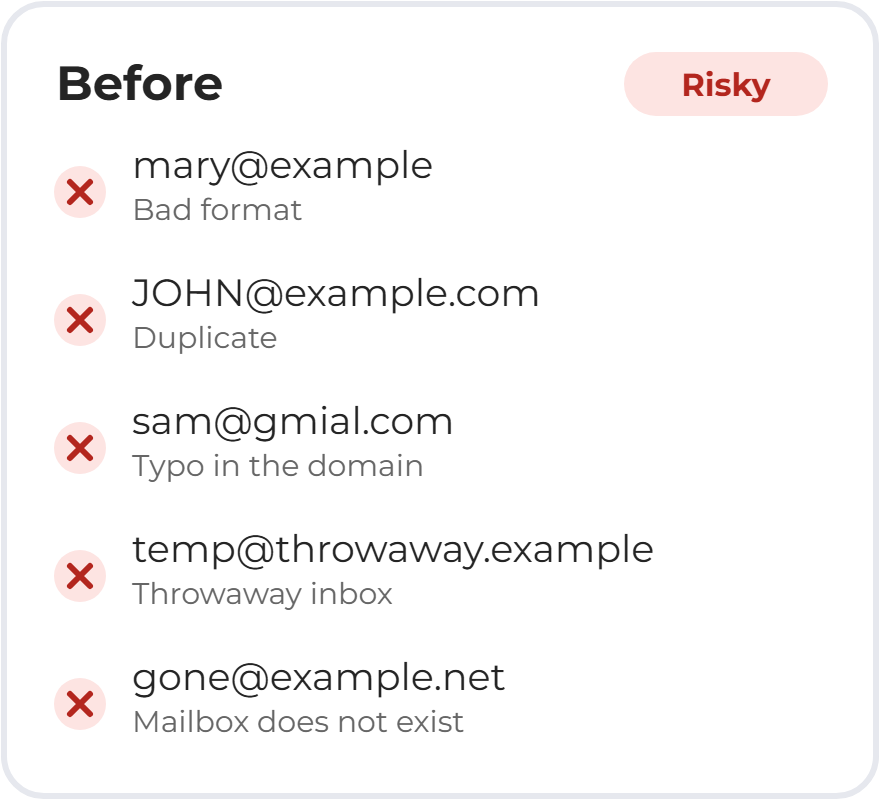
- Removes duplicates, typos and dead addresses
- Asks the mail server if the mailbox really exists
- Checks up to 1,000,000 addresses in one run
- Pay once with no renewals, or start free
Desktop software for Windows. Mailbox checks need your own server. See what you need.
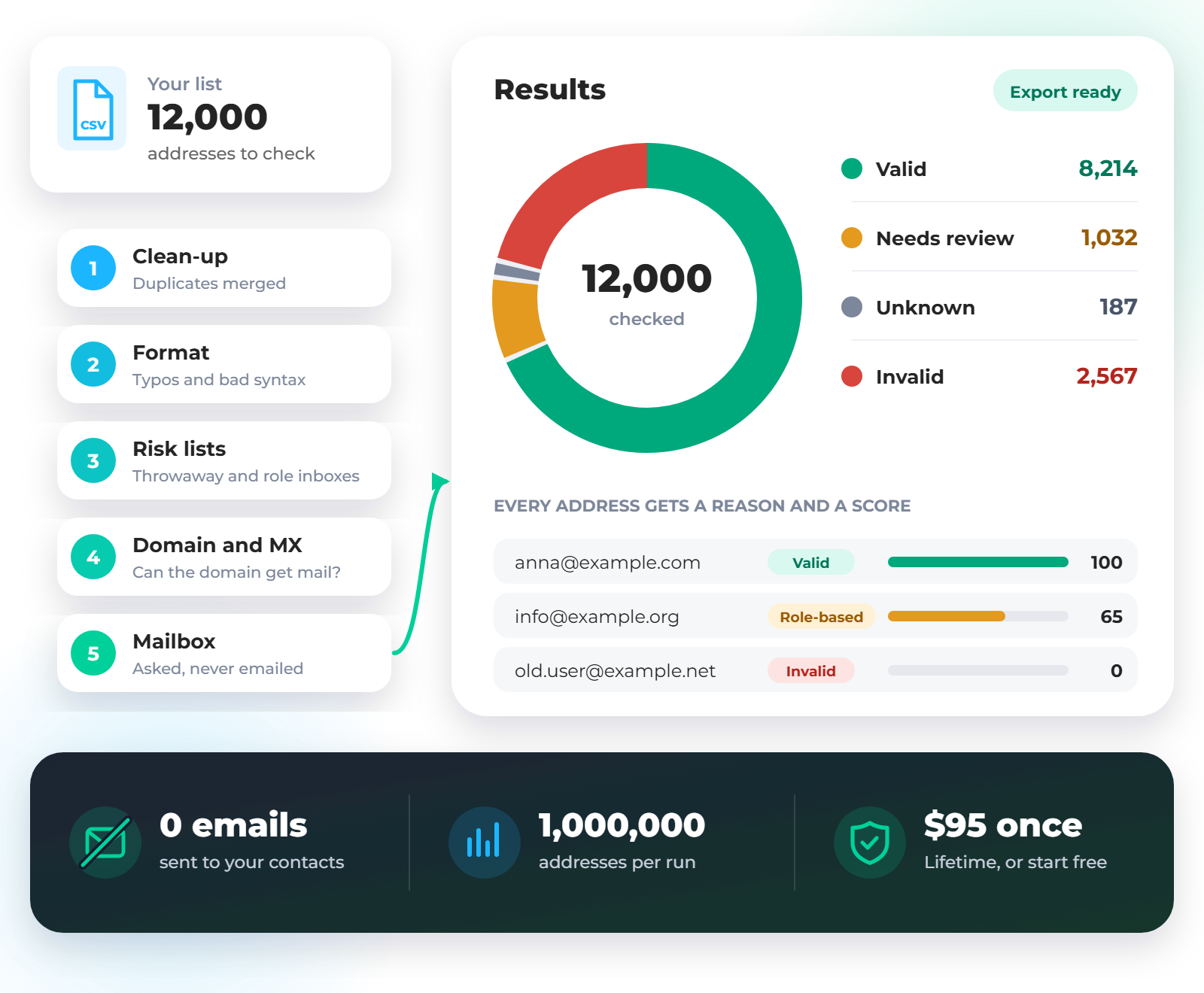
Illustration with sample data.
Every Bad Address Works Against You
Email lists go stale. People change jobs, companies close and typos slip in. If you keep sending to those addresses, you pay for it in three ways.
More bounces
Mail sent to a dead address comes straight back. A high bounce rate tells mail providers your list is not well looked after.
A weaker sender reputation
Reputation decides whether your mail reaches the inbox or the spam folder. Bad data puts it at risk, even for the people who want to hear from you.
Wasted money
Many email tools charge by contact or by send. Why pay to reach an address that no longer exists?
How to Clean an Email List in 3 Steps
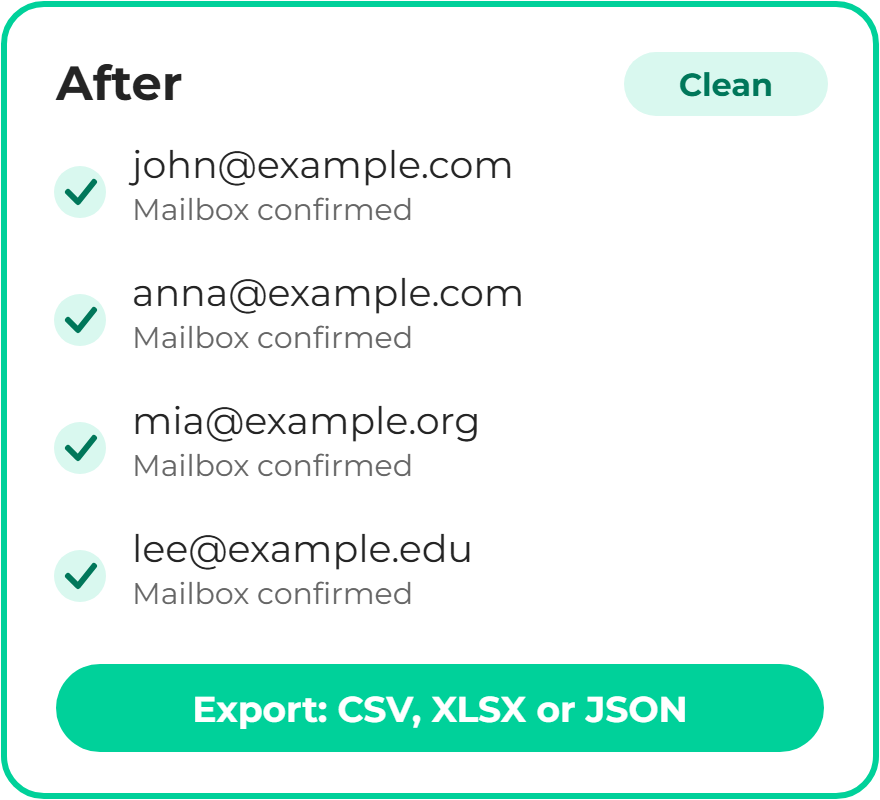
You don’t need to be technical to read the results. Every address gets a plain status and a reason.
Add your list
Paste addresses or drop in a CSV, TSV, TXT or XLSX file. The app finds the email column and removes duplicates and bad formats straight away.
Press run
Choose a Full check for the mailbox or a Domain check for a quick pass. Watch the live counters, and pause or resume whenever you like.
Export the good ones
Filter the results and export to CSV, XLSX or JSON. Your next campaign starts with a list you can trust.
Five Checks on Every Email Address
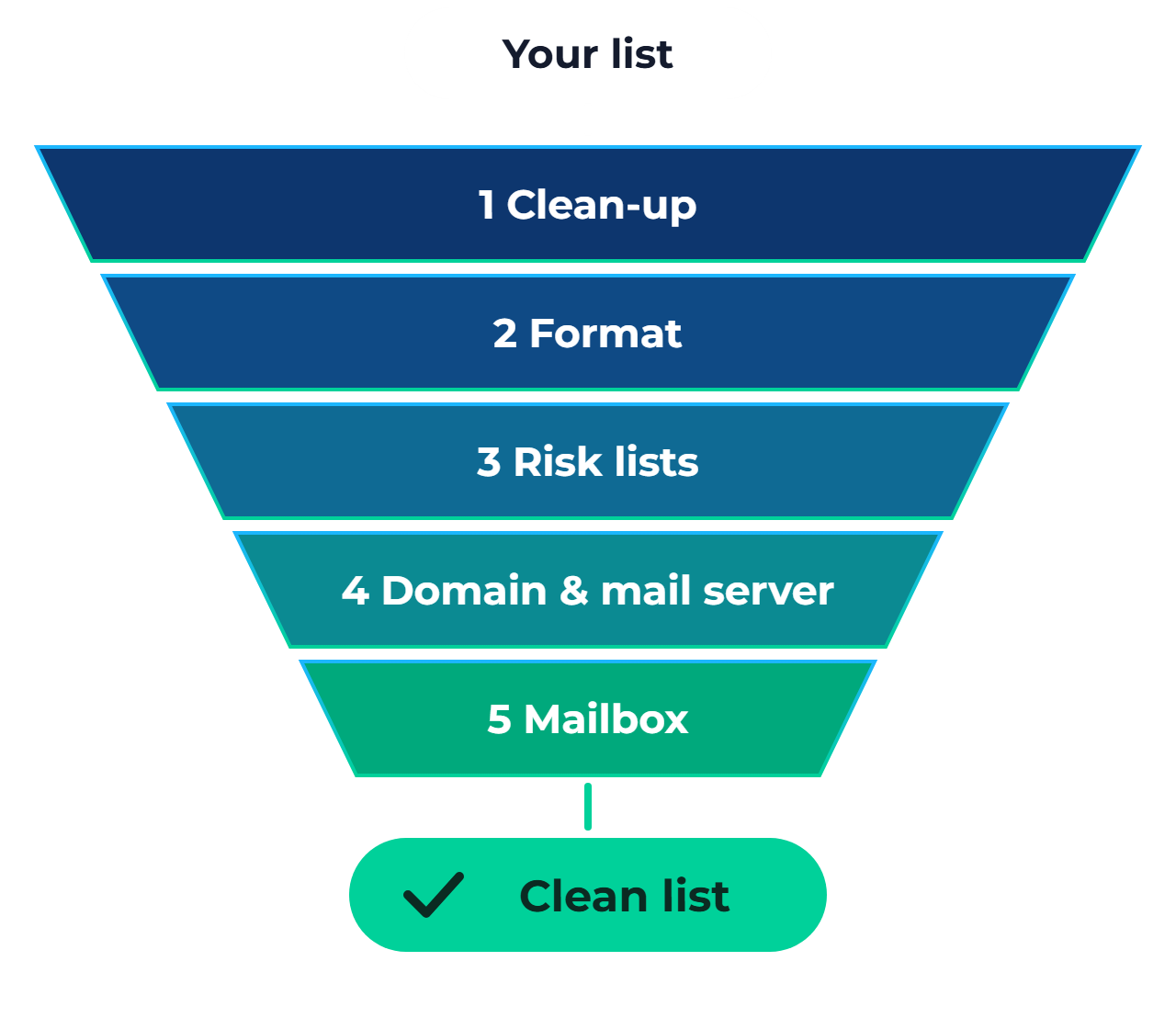
Each address moves through up to five checks. It stops as soon as the answer is clear, so a bad address never wastes time.
- Clean-up Trims spaces, fixes capital letters and merges duplicates.
- Format Catches addresses that are written incorrectly.
- Risk lists Flags throwaway inboxes and shared addresses like info@, and suggests fixes for common typos.
- Domain and mail server Confirms the domain exists and is set up to receive email.
- Mailbox Asks the recipient’s mail server if the mailbox exists, then ends the conversation before any email is sent.
Clear Results You Can Act On
Email List Cleaner doesn’t guess, and it doesn’t use AI. The same inputs follow the same rules, and an uncertain answer is never reported as Valid or Invalid.
Valid
A mail server confirmed the mailbox exists. Keep it.
Needs review
It may work but isn’t guaranteed, such as a throwaway inbox or a catch-all domain. The row says why.
Unknown
It couldn’t be checked this time, perhaps because of a timeout or a block. Re-check it later.
Invalid
Confirmed bad: wrong format, no such domain or no such mailbox. Remove it.
Every address also gets a reason and a score from 0 to 100, so you can sort your list and decide how careful to be. After a Domain check, passing rows read “Domain Exists”, because the mailbox itself was not checked.
Built for Real Lists and Real Workdays
Handles big files
Up to 1,000,000 different addresses in one run, with results that appear live as they arrive.
Pause, resume and re-check
If your internet drops, the run pauses instead of marking addresses wrongly. Re-check unresolved addresses later.
Use several servers
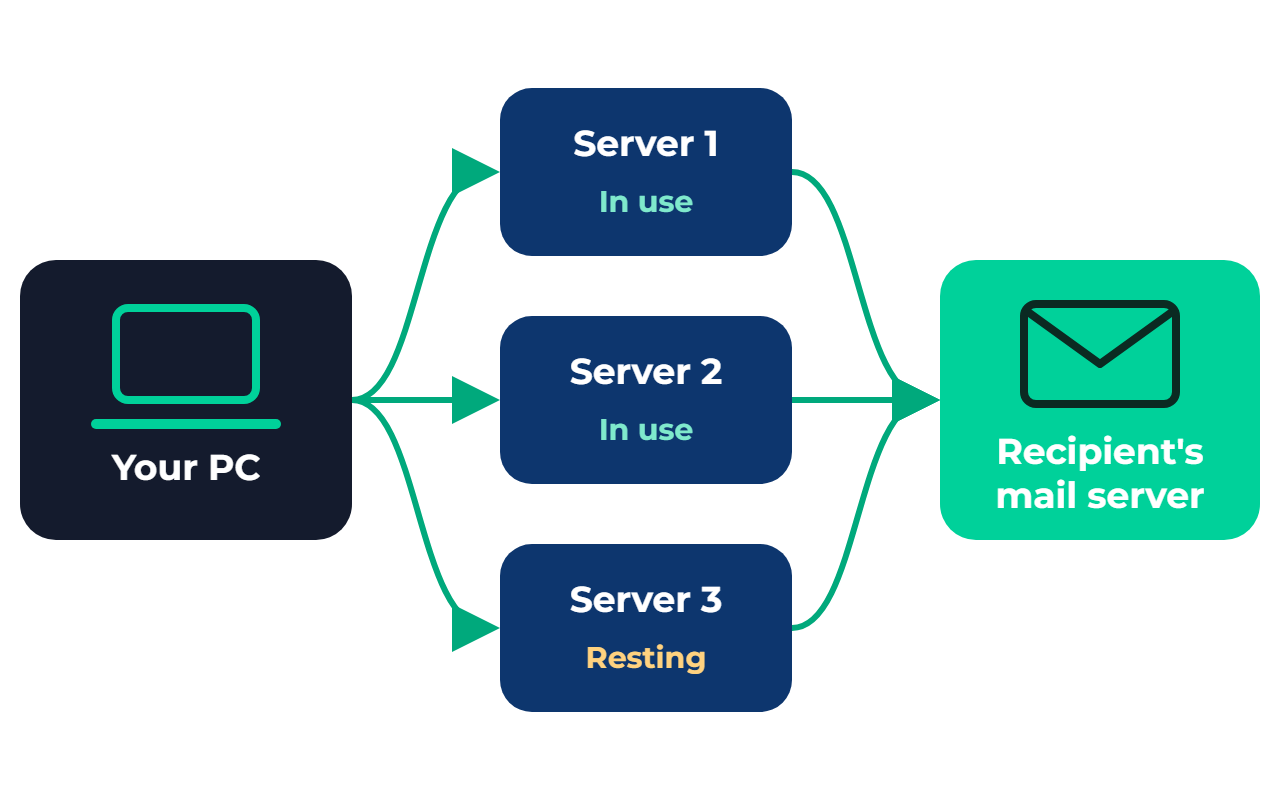
Add more than one server and the app rotates between them, showing what each one is doing.
Protects your IP address
Sensible speed limits apply to each email provider. If a mail provider starts blocking, the run pauses itself.
Catch-all detection
Some domains accept every address, real or not. The app spots them and labels them instead of calling them Valid.
History and dashboard
Open past runs, re-run them or export them again, and see your totals across every saved run.
Desktop Email Verifier vs. Pay-Per-Check Cloud Tools
Cloud verifiers are quick to start, but many charge more as your list grows. Here’s the honest trade-off.
| Email List Cleaner | Typical pay-per-check tool | |
|---|---|---|
| What you pay for the software | $95 once, or $10 a month | Often priced by the number of checks |
| Cost of a bigger list | No charge per address on paid plans | Often goes up with volume |
| Your files | Stay on your computer | Usually uploaded to the provider |
| Control over checks | Your servers, your speed settings | Handled by the provider |
| Setup | Install the app and connect a server | Usually none, just sign up |
| Other costs | Your own server for mailbox checks | Usually none beyond credits |
The One Thing You’ll Need: A Server
To check a mailbox, a server has to talk to the recipient’s mail server over port 25, and most home and office connections block that. So Email List Cleaner runs mailbox checks through a server you control. That also means you aren’t paying anyone per address.
Any Linux VPS works if its hosting company allows outbound port 25. Just enter its IP address and login. Nothing gets installed on the server. Your server password stays in your computer’s secure credential store.
The built-in test tells you where you stand. It checks a server step by step and only lets you use one that can really verify addresses. Most ordinary SMTP accounts say yes to every address, so they won’t pass.
No server yet? You can still run a Domain check without one, or browse server options at Sale Leads.
Who Email List Cleaner Is For
Email marketers
Check your list before each campaign and keep bounces down.
Agencies
Clean client lists in separate runs, with a saved record of each one.
Sales teams
Stop chasing contacts whose addresses no longer work.
Small businesses
Clean up years of customer contacts without paying per address.
Simple Email List Cleaner Pricing
Start free, or pay once and be done with it. Lifetime costs less than 10 months of the Monthly plan.
Free
Everything you need to clean a small list.
$0
- 30 addresses a day
- Mailbox checks through your own server
- Domain checks with no server
- History, dashboard and exports
- Internet needed to check your allowance
Monthly
For a busy month or a one-off clean-up.
$10 /month
- No daily limit
- Mailbox checks through your own servers
- Rotation across servers, with a tester
- Reference-data updates included
Yearly
For teams that clean lists all year.
$45 /year
$95 regular price
- No daily limit
- Mailbox checks through your own servers
- Rotation across servers, with a tester
- Reference-data updates included
Best value
Lifetime
Pay once, keep verifying.
$95 once
$195 regular price
- Everything in the paid plans
- One payment, no renewals
- All v3 updates included
- Priority support
Prices in US dollars. Mailbox checks need your own server, which is not included. Please try the Free plan first, as refunds are limited. See our refund policy.
What Stays on Your PC and What Doesn’t
The app runs on your computer, and you should know exactly what it shares. With an account or the Free plan, it reports its work to the Email List Cleaner server so support can help you and plan limits can be checked. It asks you to accept this first.
Sent, once you accept
- Each verified address and its result, which the support team can see
- Run names, sizes, statuses and counts
- Server name, IP, port and user name
- Warning and error log lines
- PC name, operating system, app version and settings
Never sent
- The files you import
- Columns you did not verify
- Your server passwords
- Passwords for anything else on your PC
- Anything before you accept the notice
VeriMail Pro Is Now Email List Cleaner
You’re in the right place. The new name says exactly what the software does.
- Same product, still from Sale Leads
- Your VeriMail Pro license key still works
- Your settings and history carry over when you install the new version
- After installing, you can remove the old “VeriMail Pro” from Windows Settings > Apps
Email List Cleaner FAQ
Is Email List Cleaner the same as VeriMail Pro?
Yes. VeriMail Pro is now called Email List Cleaner. It is the same product from Sale Leads under a new name, and your VeriMail Pro license key still works.
Will the people on my list get an email?
No. The app asks the mail server whether a mailbox exists and ends the conversation before any message is sent. Nothing arrives in anyone’s inbox.
Do I need my own server?
For mailbox checks, yes. Any Linux VPS whose hosting company allows outbound port 25 works, and nothing gets installed on it. You can also try an SMTP login, but most ordinary SMTP servers say yes to every address, so the built-in test refuses them. Domain checks need no server.
Can I try it for free?
Yes. The Free plan checks 30 addresses a day and includes history, the dashboard and exports. It asks for your email address and needs an internet connection to check your daily allowance.
Does my list stay on my computer?
The app runs on your computer and your imported files stay there, including any columns you did not verify. With an account or the Free plan, it reports each verified address and its result to the Email List Cleaner server so support can help you and plan limits can be checked. The support team can see them. You are shown exactly what is shared and must accept before anything is sent.
How accurate are the results?
An address is only marked Valid when a mail server confirms the mailbox, and only marked Invalid when it is confirmed bad. If the answer is uncertain, the address goes to Needs review or Unknown with the reason, so you decide. Some servers accept every address, and those can never be fully confirmed by any checker.
How big a list can it handle?
One run takes up to 1,000,000 different addresses. Spreadsheets over 500,000 rows should be saved as CSV first.
What do I get with Lifetime?
One payment with no renewals, everything in the paid plans, all version 3 updates and priority support.
Which computers does it run on?
Email List Cleaner is desktop software for Windows. It runs as an installed app, not in a web browser.
Can I get a refund?
Please try the Free plan first, because refunds are limited. Change of mind and discounted purchases are not normally eligible. If something is wrong on our side, contact us and we will work toward a fair outcome. The full terms are in our refund policy.
Can I use it on any list?
Use it on lists you already have and are allowed to use. It does not find, guess or generate addresses, and you are responsible for following laws such as CAN-SPAM, CASL and GDPR.
Send Your Next Campaign to a Cleaner List
Pay once, check your lists whenever you need to, and stop mailing addresses that don’t exist.
Formerly VeriMail Pro. Need help choosing? Contact us.
Email List Cleaner is a list-cleaning tool for lists you already have. It does not send marketing email or find new addresses. Results depend on how each mail server answers, and no checker can guarantee delivery or campaign results.